
What Is Sanctions Screening Software?
Sanctions screening software is the tool layer that runs list checks for you: it compares customers, payments, and addresses against published sanctions lists, flags the hits, and keeps the record of every decision. This page is about how to pick one. The five dimensions below are what a working evaluation actually compares. The OFAC sanctions hub collects the related guides.
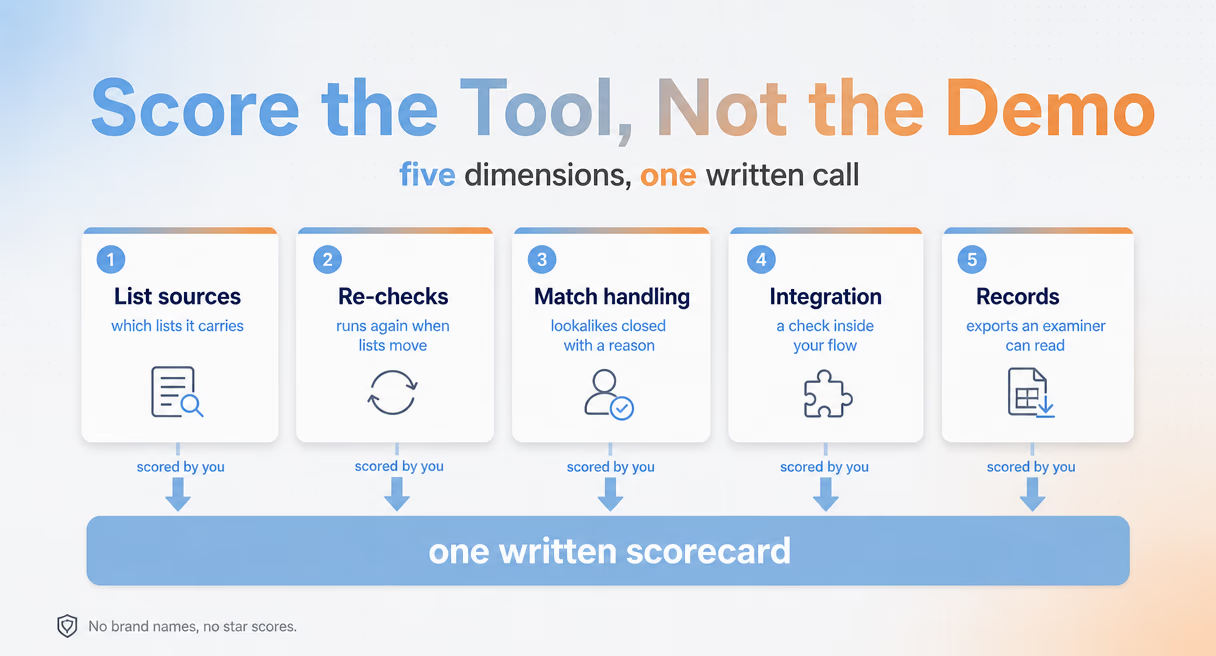
Buy versus build is the first fork. A script that calls a public list API can check one name; it cannot watch the lists move, handle fuzzy matches at volume, or hand an examiner a record. Software earns its fee at those three joints, and everything in this guide is about testing them before you sign anything.
What screening is, step by step, is covered in the sanctions screening guide; this page stays on the choice of tool. The AML hub covers the wider compliance workflow. This page compares screening categories and includes Phalcon Compliance as a positioning example; it does not rank third-party vendors or quote third-party scores.
The lists themselves come from sanctions programs published by the Treasury office that runs them, and the official programs and country information directory is where each program's scope lives. A tool that screens lists it does not actually carry is the quietest way an evaluation goes wrong, which is why list sources come first below.
Five Things Screening Software Has to Get Right
Screening tools differ in five places, and the list is short enough to hold in one meeting. Which list sources do they carry? How do they handle updates and re-checks? How do they treat fuzzy matches? How do they plug into your systems? And what records do they hand over? Score every candidate on all five before shortlists form.
First, list sources. The SDN list is the floor, not the ceiling: the European Union, the United Kingdom, and the United Nations all publish their own designations, and a counterparty can sit on one list long before another. Ask which lists a tool carries, who maintains them, and how quickly a new designation reaches its matching engine. The eCFR text of 31 CFR Chapter V gives the U.S. side of that list system, the statutes and rules the screening duty stands on.
Second, updates and re-checks. Lists move without notice, so the real question is what triggers a second look: a calendar date, or the list itself. Continuous screening re-runs your whole book when a designation lands, which is the standard to hold a vendor to. Remember too that a clean screen is not a clean counterparty, the ownership trap the OFAC 50 percent rule explains, and ask how the tool handles the parties a list never names.
Third, match handling. Names arrive transliterated, hyphenated, and split across fields, so every engine uses some form of fuzzy matching, and every engine produces false positives. The test is the workflow after the hit: can an analyst close a lookalike with a written reason, inside the tool, in one motion? Triage on a single lookup is what the OFAC check guide teaches by hand; here it becomes a feature requirement rather than a habit.
Fourth, integration. A checker that lives in a browser tab checks nothing on its own. Ask practitioners who have automated vendor screening what actually mattered and the answers are plumbing. A screening endpoint called from inside the ERP's scripting layer, payments held at the point of entry, and an audit note written for each hold. Ask for a REST API and custom webhooks, then ask which of your flows each one actually fits.
Fifth, records. The output that matters is the one an examiner can pull later: what was checked, against which list state, who decided, and when, exportable as PDF or CSV with the decision trail attached. Ask to see a sample record during the evaluation, not after go-live, because that sample is the product.
The buyer's checklist fills this page, and the OFAC sanctions hub holds the guides behind each row.
Sanctions Screening Tools, Compared
The honest comparison is by tool type, not by brand: general compliance suites, onchain screening APIs, and Phalcon Compliance sit in different rows of the same table. Read the table as a map of where each type is strong, then match the row to your own risk, because no row wins every column.
| Tool type | List sources | Updates and re-checks | Match handling | Integration | Records |
|---|---|---|---|---|---|
| Established compliance suites | Broad bundles, regional depth varies | On the vendor's schedule or your setup | Tunable matching with case tools | Sales-led, connector lists vary | Strong case files, heavier setup |
| Onchain screening APIs | List plus address-label coverage varies | On demand, driven by your calls | Risk scores with a lighter triage UI | API-first, you build the workflow | API logs, export formats vary |
| Phalcon Compliance | Sanctioned labels among 17 risk indicator categories | Continuous address monitoring (Monitor) | Address and transaction screening, five risk levels | REST API and webhooks on higher plans | Audit logs with PDF and CSV export |
Pick by flow and by risk rather than by name recognition. A licensed institution that already runs a case-management stack often starts from the first row; a team that lives in its own payment code often starts from the second. The third row fits teams that want the screening record written inside the payment path, and the Phalcon Compliance page lists the current plans.
How to Integrate Screening into Your Workflow
Integration is a three-step evaluation using an environment and API access the vendor actually offers: test the endpoint, place one screening call in an appropriate payment step, then review the event record. Confirm access and plan requirements before starting; a sandbox or free API trial is not available from every vendor.
A screening call in the API pipeline returns in about 100 milliseconds (per BlockSec), quick enough that the check can live inside a deposit or withdrawal step instead of running after it. Webhooks close the other half: when a risk level moves, the system can call your side rather than waiting for the next poll.
One boundary before the wiring starts: the OFAC compliance program guide covers the risk assessment and accountable owner an examiner looks for. A tool supports the records; it cannot supply the institution's policy or owner. For the wider legal background, see What Is OFAC? and the enforcement guide. If the shopping list is a whole compliance stack for a licensed VASP, the VASP tools guide covers complementary categories, while this page compares screening alone.
Phalcon Compliance offers three free manual checks per month to evaluate the interface and screening results. These checks do not include API access and cannot be used to wire a payment flow end to end. API integration requires Scale or Enterprise access; Phalcon Compliance does not currently offer an API sandbox or free API trial. The OFAC sanctions hub collects the rest of the family: the working process, the check guide, the list itself, and the traps that catch careful teams.