Willkommen zur Serie "Solana vereinfacht", die Ihnen helfen soll, Solanas komplexes Ökosystem zu meistern. Im ersten Artikel haben wir Solanas Betriebsmechanismus, sein Kontenmodell und seine Transaktionsstruktur untersucht. Im zweiten Artikel haben wir Sie durch das Schreiben und Testen Ihres ersten Solana-Programms in Rust geführt.
Als dritter und letzter Teil dieser Serie führt Sie dieser Artikel durch die Analyse einer einfachen Solana-Transaktion mit Phalcon Explorer. Bevor wir uns in die praktische Solana-Transaktionsanalyse stürzen, wollen wir zunächst untersuchen, wie Token auf Solana implementiert werden, ein grundlegender Aspekt für das Verständnis von Transaktionsflüssen.
Verständnis der Solana-Token-Implementierung
Token auf Solana lassen sich grob in zwei Kategorien einteilen: Native Token und Andere Token (SPL-Token). Das Verständnis dieser Unterschiede ist entscheidend für eine effektive Solana-Transaktionsanalyse.
Native Token (SOL)
Der Native Token bezeichnet Solanas Hauptkryptowährung, SOL. Wie im ersten Artikel erwähnt, hat jedes Konto in Solana ein Feld Lamports, das den SOL-Saldo dieses Kontos aufzeichnet. Lamports sind die kleinste Einheit von SOL, wobei 1 SOL 1 Milliarde Lamports entspricht. SOL wird für Transaktionsgebühren, Staking und die Netzwerkteilnahme verwendet.
Andere Token (SPL-Token)
Für andere Token nutzt Solana ein robustes Framework, das auf einem Programm-Konto (dem Token Program) und zwei Arten von Datenkonten basiert: dem Mint-Konto und dem Token-Konto. Diese Architektur bietet alle notwendigen Funktionalitäten für die Verwaltung und Interaktion mit verschiedenen Token auf der Solana-Blockchain.
Das Solana Token Program
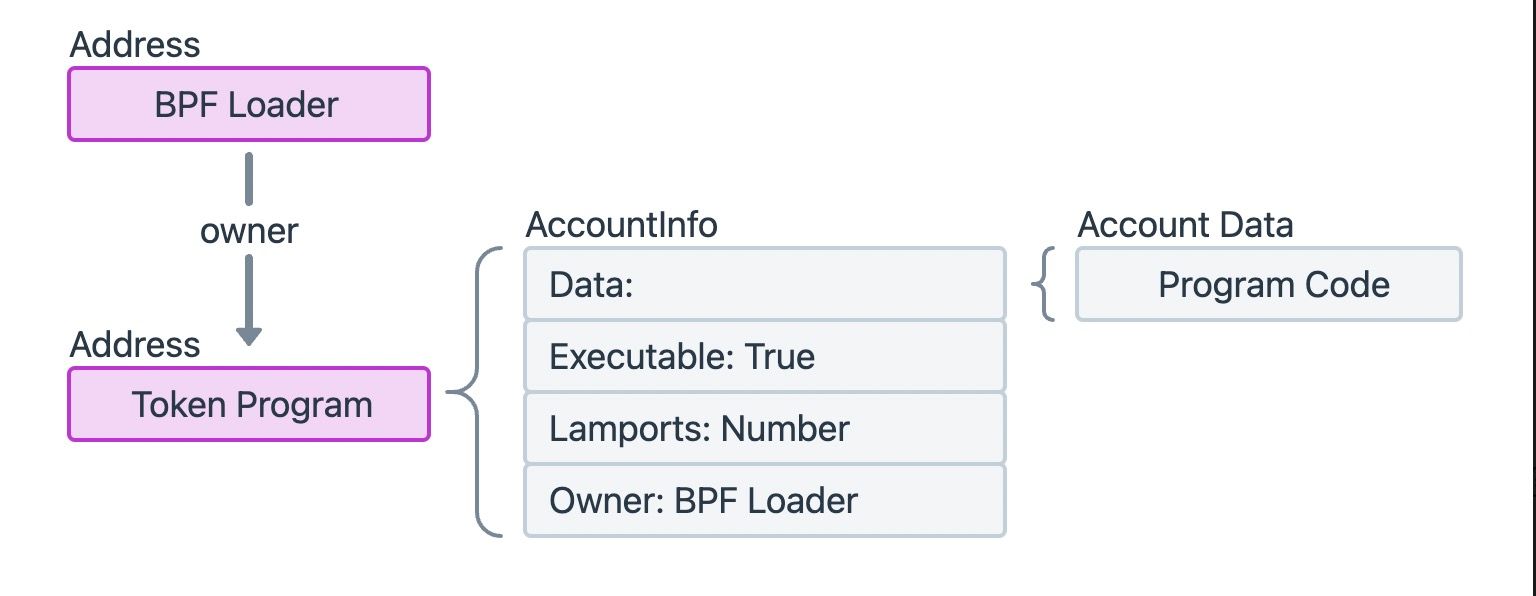 Das Token Program ist ein Programm-Konto, das von der Solana Program Library (SPL) bereitgestellt wird, wodurch sein Feld
 Executable in AccountInfo auf True gesetzt wird.
Ähnlich wie das Systemprogramm wird das Token Program an einer festen Adresse auf Solana bereitgestellt, und sein Eigentümer ist der BPF Loader. Als leistungsstarkes Programm-Konto implementiert es zahlreiche Anweisungen, um vielfältige Token-Funktionalitäten bereitzustellen. Einige Anweisungen werden beispielsweise verwendet, um ein Mint-Konto zum Initialisieren eines neuen Tokens zu erstellen, oder um ein Token-Konto zum Aufzeichnen der Anzahl der von einer bestimmten Adresse gehaltenen Token zu erstellen. Andere Anweisungen erleichtern wesentliche Token-Operationen, wie die MintTo-Anweisung zur Erhöhung des Token-Angebots oder die Transfer-Anweisung zur Übertragung von Token zwischen zwei Adressen.
Es ist wichtig zu beachten, dass das Token Program, da es für die Erstellung von Mint-Konten und Token-Konten verantwortlich ist, auch der Eigentümer dieser Konten ist, was ihm die Kontrolle über deren Lebenszyklus und Daten gewährt.
Mint-Konto-Struktur
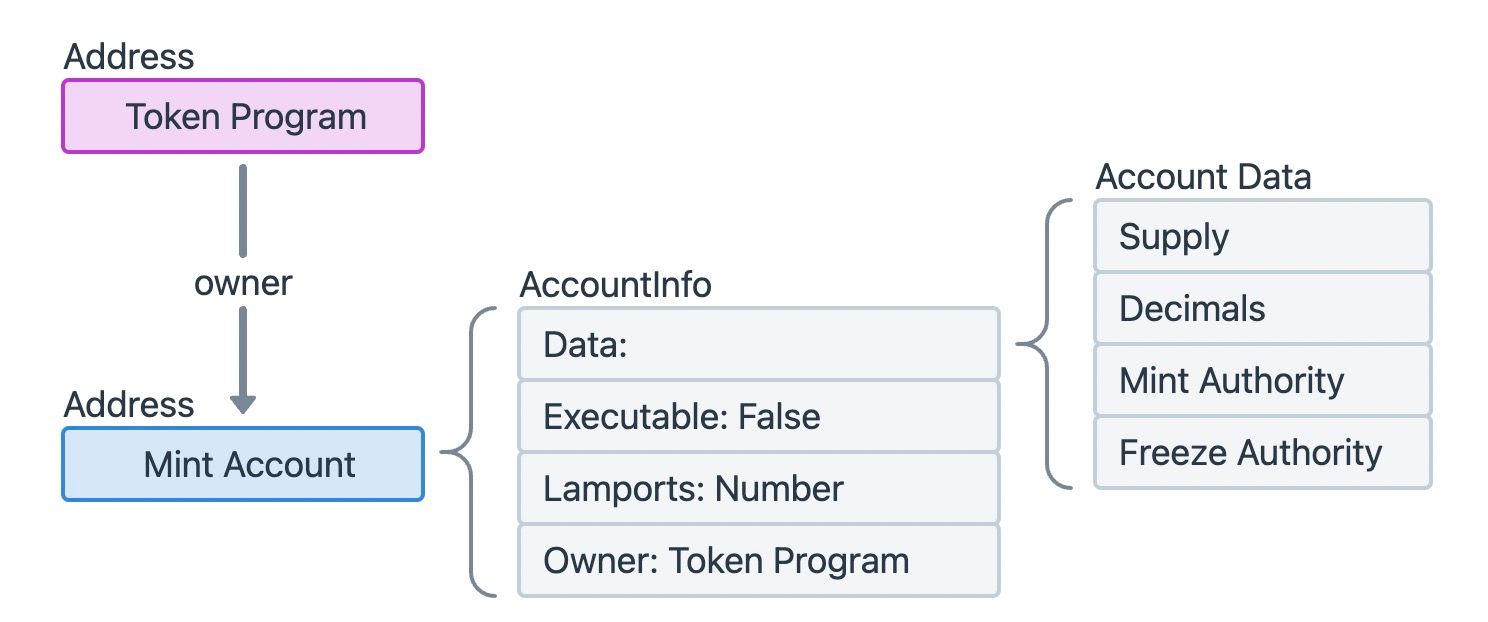 Ein Mint-Konto ist ein Datenkonto, was bedeutet, dass sein Feld
 Executable in AccountInfo False ist. Auf Solana entspricht jeder eindeutige Token (z. B. USDC, RAY usw.) einem einzelnen Mint-Konto. Dieses Konto speichert kritische Informationen wie das Gesamtangebot des Tokens, die Anzahl der Dezimalstellen und die Adresse des Kontos, das die Berechtigung hat, den Token zu prägen (erstellen) oder zu verbrennen (zerstören).
Token-Konto-Struktur
Ein Token-Konto zeichnet den Betrag eines bestimmten Tokens auf, der von einer Einzelperson oder einem anderen Programm gehalten wird. Für jede Art von Token hat jede Entität, die diesen Token hält, ein entsprechendes Token-Konto. Wenn ein Benutzer beispielsweise fünf verschiedene SPL-Token hält, hat er fünf unterschiedliche Token-Konten, eines für jeden Token-Typ.
Ein Token-Konto ist ein Datenkonto, und das Feld Data seiner AccountInfo besteht typischerweise aus drei wichtigen Unterfeldern:
- Mint: Die Adresse des Mint-Kontos, das diesem spezifischen Token-Konto entspricht und identifiziert, welchen Token es hält.
- Owner: Der öffentliche Schlüssel des Kontos mit der Berechtigung, Token von diesem Token-Konto zu übertragen. Dies ist der eigentliche "Eigentümer" der Token.
- Amount: Die aktuelle Anzahl der in diesem Token-Konto gehaltenen Token.
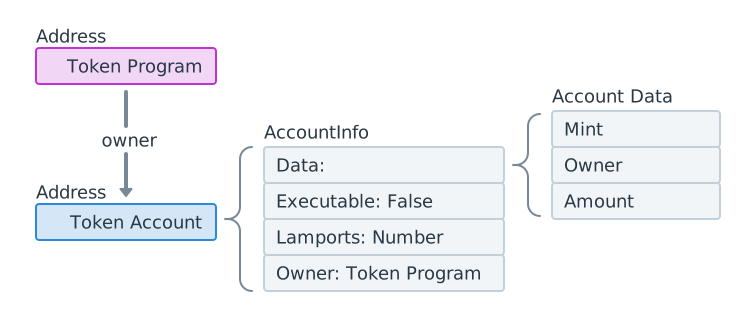 Es sei darauf hingewiesen, dass das Feld
 owner in AccountInfo (das bestimmt, wer die Daten des Kontos ändern kann) und das Feld owner innerhalb der Data des Token-Kontos (das angibt, wer die Token besitzt) völlig unterschiedliche Konzepte sind. Ersteres ist eine allgemeine Eigenschaft des Solana-Kontos, während letzteres spezifisch für SPL-Token-Konten ist.
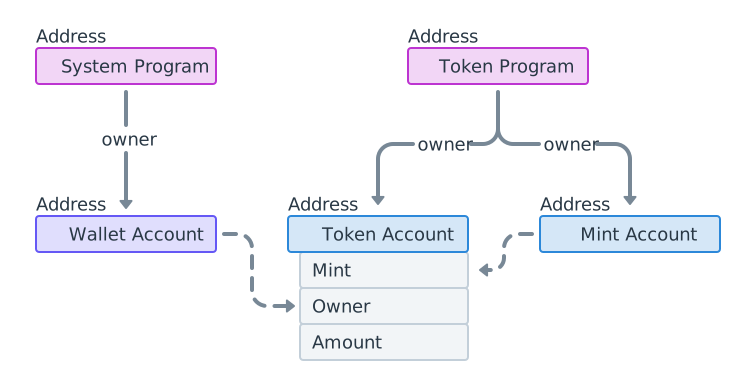
Indem wir diese Konzepte verbinden, können wir das folgende Diagramm der Kontobeziehungen visualisieren. Sowohl das Systemprogramm als auch das Token Program werden an eindeutigen, festen Adressen auf der Blockchain bereitgestellt und funktionieren als Kernbibliotheken. Ein Wallet-Konto kann mehrere Token-Konten halten, und es ist der eigentliche "Eigentümer" der Token innerhalb dieser Token-Konten. Das Feld Mint in Token-Konten desselben Typs verweist auf das eindeutige Mint-Konto dieses Tokens, das Informationen wie das Gesamtangebot des Tokens speichert.
Analyse von Solana-Transaktionen mit Phalcon Explorer
Während traditionelle Explorer wie Solscan wertvolle Daten liefern, können sie manchmal Informationen auf eine Weise präsentieren, die für die detaillierte Solana-Transaktionsanalyse weniger intuitiv ist. Betrachten wir zunächst eine Transaktion in Solscan und sehen dann, wie BlockSecs Phalcon Explorer eine klarere und umfassendere Ansicht bietet.
Anzeige von Token-Konten in Solscan
Wir können Solscan verwenden, um die Änderungen an Token-Konten in dieser Beispieltransaktion anzuzeigen:
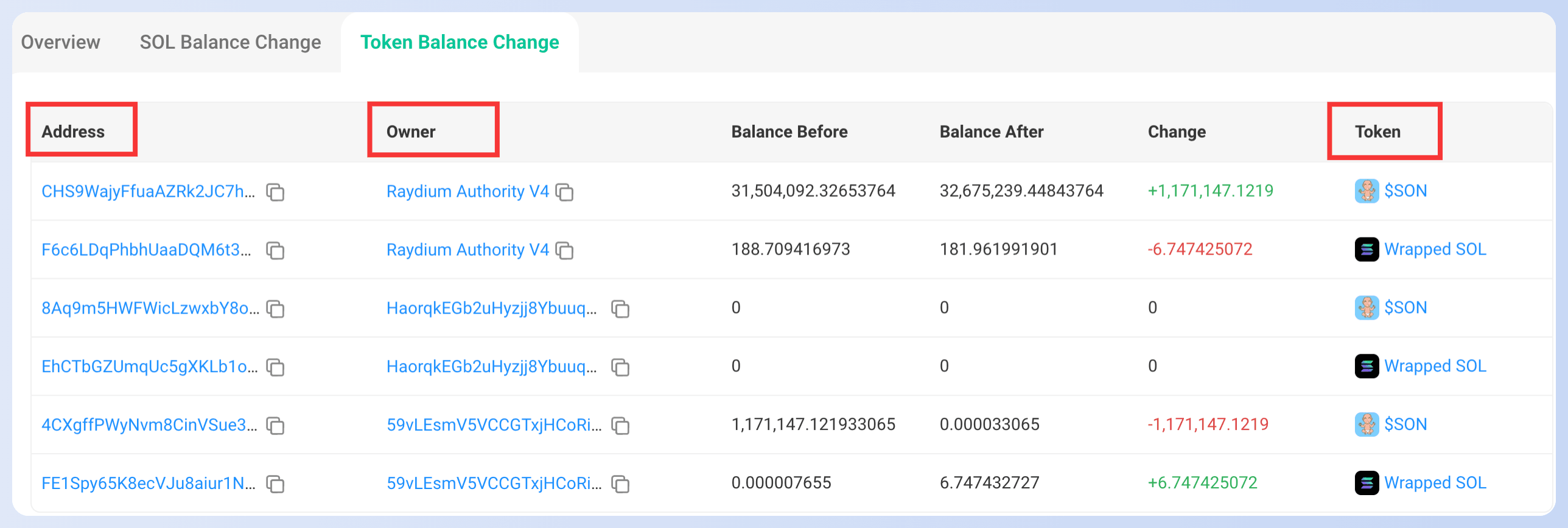 Die Spalte
 Address listet alle an der Transaktion beteiligten Token-Konten auf. Die Spalte Owner gibt den tatsächlichen "Eigentümer" des Tokens an (den owner im Feld Token-Konto-Daten). Die Spalte Token entspricht dem Mint-Konto des aktuellen Tokens. Wir können auf das "$SON" auf der rechten Seite der ersten Zeile klicken, um weitere Details zu erhalten:
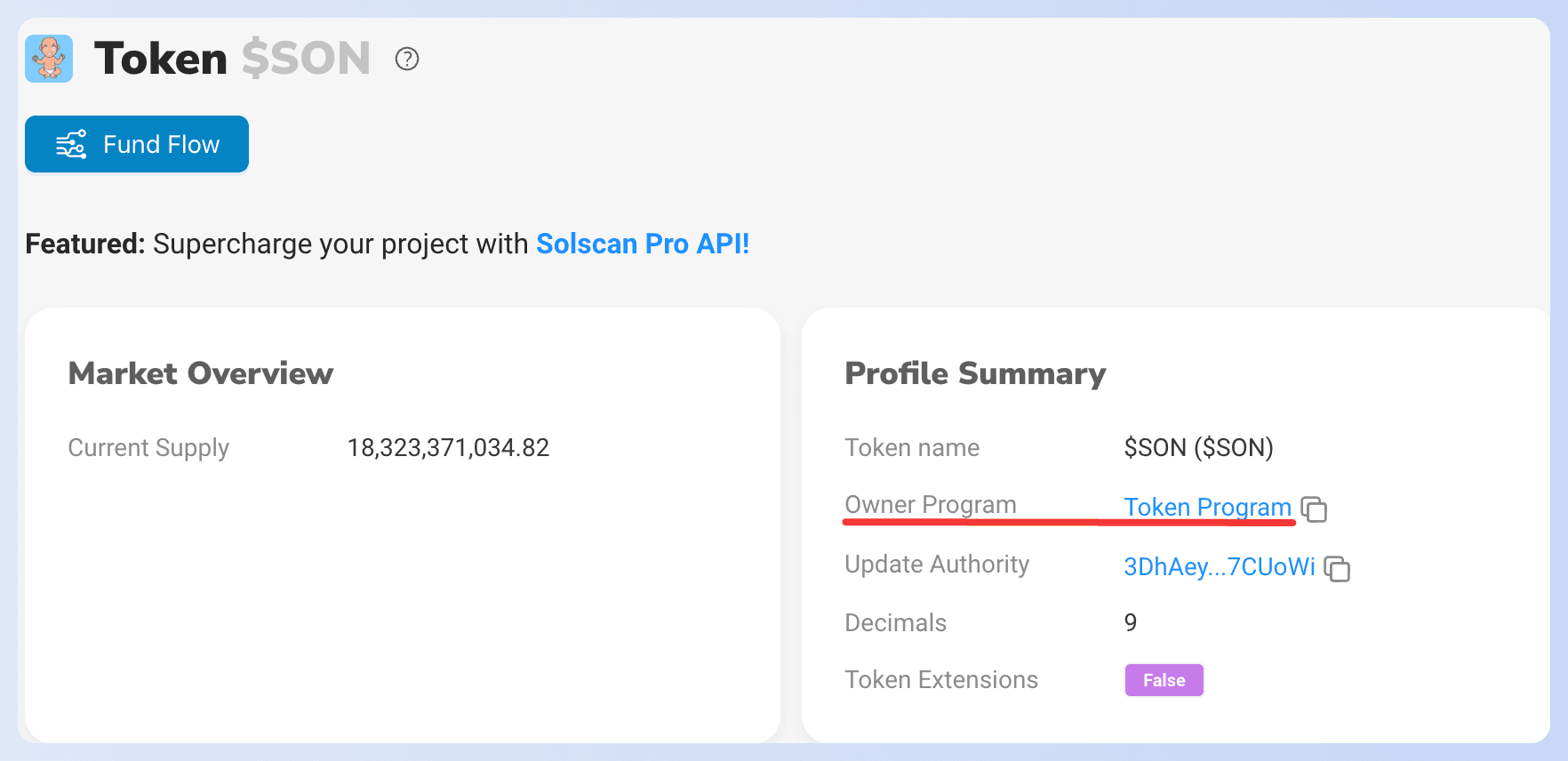 Das Feld
 Owner Program in der Profilübersicht zeigt an, dass der Eigentümer des aktuellen Mint-Kontos das Token Program ist. Nun haben wir alle drei Arten von Konten in Solscan abgeglichen.
Diese Anzeige in Solscan kann jedoch etwas irreführend sein. Beispielsweise ist im vorherigen Bild unklar, ob das erhöhte Guthaben in der ersten Zeile der Adresse CHS9WajyFfuaAZRk2JC7hRJvPHXmG5fC94gtAPbnLjuY oder Raydium Authority V4 gehört. Solche Mehrdeutigkeiten erschweren den Nutzern das Verständnis des tatsächlichen Transaktionsflusses. Darüber hinaus bemerken die Leser möglicherweise, dass SOL-Token und andere Token in Solscan in getrennten Abschnitten angezeigt werden. Während diese Trennung technisch sinnvoll ist, wäre sie leichter zu verstehen, wenn sie unter einem einheitlichen Token-Abschnitt präsentiert würden, um eine ganzheitliche Ansicht der Vermögensänderungen zu erhalten.
Phalcon Explorer behebt nicht nur diese Probleme, sondern führt auch viele weitere Innovationen für die detaillierte Solana-Transaktionsanalyse ein. Untersuchen wir nun mit Phalcon Explorer dieselbe Transaktion.
Wir empfehlen dringend, den Link zur Transaktion in Phalcon Explorer zu öffnen und unsere Schritte zu befolgen, um sie gemeinsam zu analysieren. Dieser interaktive Ansatz ermöglicht es Ihnen, die Transaktionsdetails besser zu verstehen und die leistungsstarken Funktionen von Phalcon Explorer für die Solana-Transaktionsanalyse zu schätzen!
Erste Schritte mit Phalcon Explorer
Tauchen Sie in Transaktionen ein, um klug zu handeln
Jetzt kostenlos ausprobierenAnzeigen und Analysieren von Transaktionen in Phalcon Explorer
 In der oberen linken Ecke der Seite sehen Sie, dass die aktuelle Transaktion als JITO MEV-Transaktion identifiziert wurde, eine wertvolle Information für Sicherheitsexperten. Sie können auch auf das Solana-Symbol neben der Transaktionssignatur klicken, um bei Bedarf direkt zu Solscan zu springen.
Die Informationen zu dieser Solana-Transaktion sind logisch in vier Hauptabschnitte unterteilt: Basic Info, Fund Flow, Balance Changes und Invocation Flow. Sie können nahtlos zwischen diesen Abschnitten wechseln, indem Sie auf die Symbole in der oberen rechten Ecke klicken, was eine umfassende Solana-Transaktionsanalyse ermöglicht.
Basic Info
 Der Abschnitt Basic Info bietet wesentliche Details zur aktuellen Solana-Transaktion. Sie können auf die Blocknummer und die Signaturadresse klicken, um zu Solscan zu springen, um Querverweise oder zusätzlichen Kontext zu erhalten. Dieser Abschnitt bietet einen schnellen Überblick, bevor Sie sich mit den Einzelheiten der Transaktionsausführung befassen.
Fund Flow
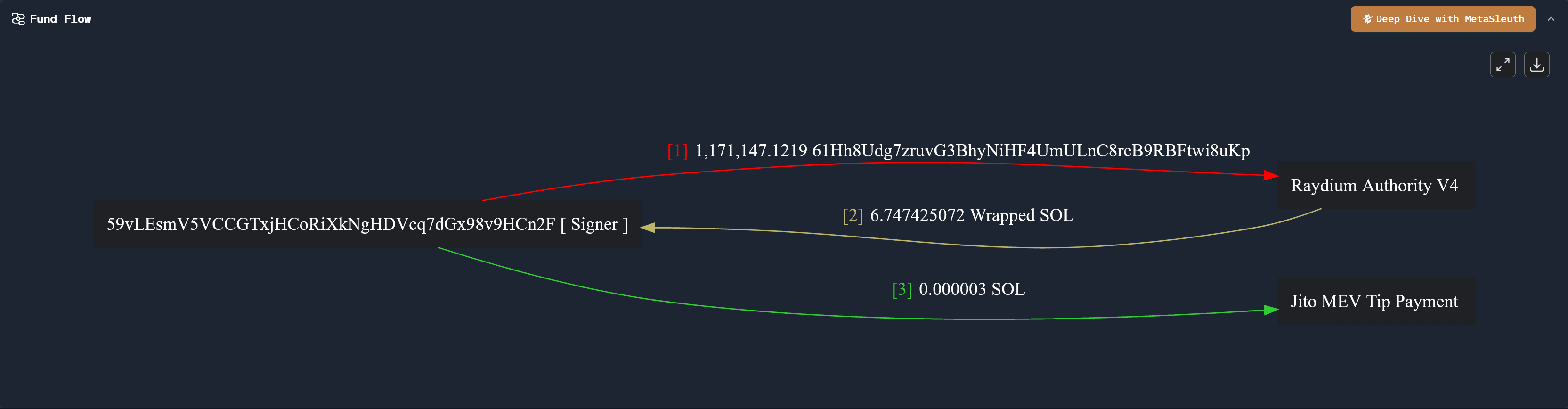 Der Abschnitt Fund Flow bietet eine klare, visuelle Darstellung der Bewegung und des Zeitpunkts von Geldern während der Transaktionsausführung, wodurch die Solana-Transaktionsanalyse intuitiv wird:
- Der Transaktionsinitiator und Unterzeichner,
59vLEsmV5VCCGTxjHCoRiXkNgHDVcq7dGx98v9HCn2F, hat zunächst einen bestimmten Betrag eines Tokens an die AdresseRaydium Authority V4übertragen. - Anschließend hat
Raydium Authority V4ungefähr 6,747 Wrapped SOL Token zurück an den Unterzeichner,59vLEsmV5VCCGTxjHCoRiXkNgHDVcq7dGx98v9HCn2F, übertragen. - Schließlich hat der Unterzeichner 0,000003 SOL an Jito als Trinkgeld für den Jito-Validator für die Ausführung der Transaktion bereitgestellt, was auf eine MEV-bezogene Aktivität hindeutet.
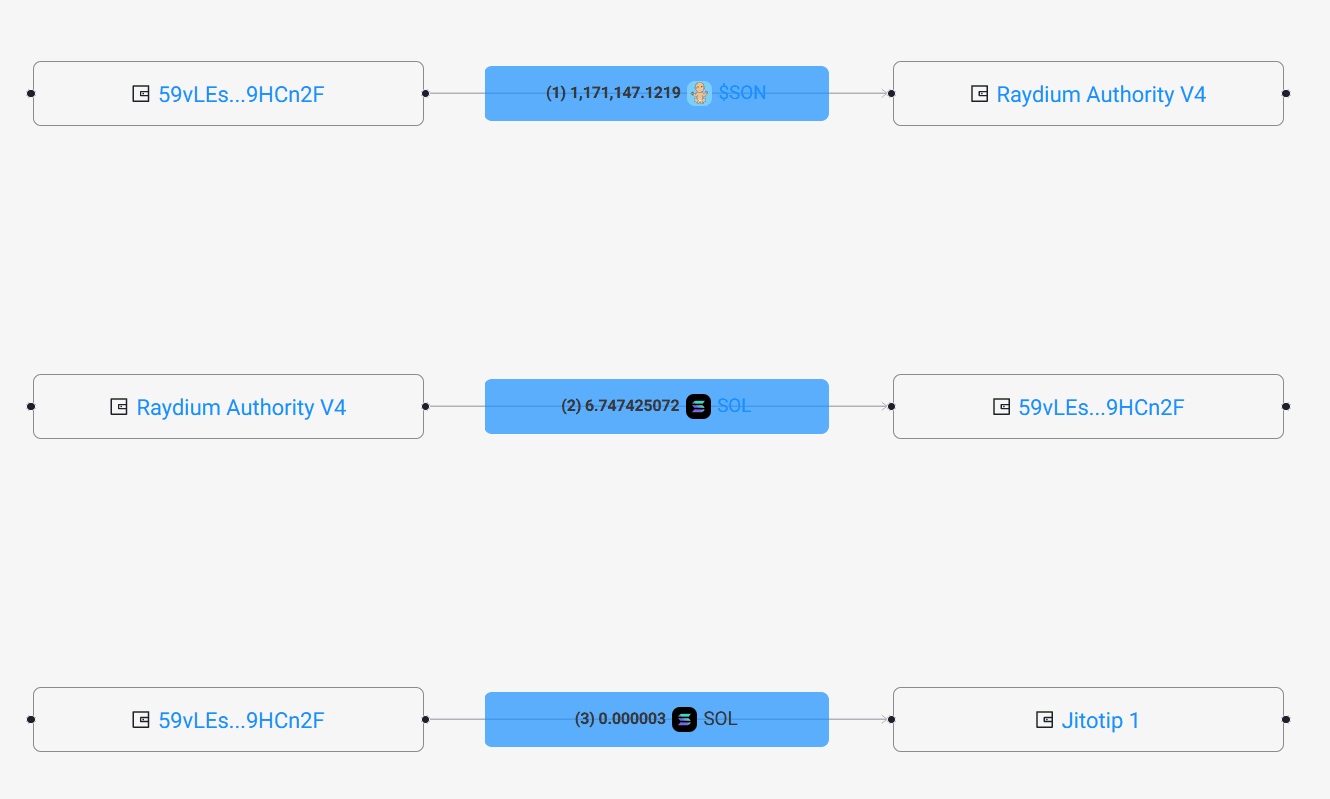
Unten sehen Sie zum Vergleich das Flussdiagramm von Solscan. Im Vergleich zu Solscan entspricht jede Adresse im Flussdiagramm von Phalcon Explorer eindeutig einem einzigen Knoten, was die Identifizierung der Beziehungen zwischen Adressen erheblich erleichtert und somit die Analyseeffizienz verbessert, insbesondere bei komplexen Solana-Transaktionen.
 Wenn Sie eine tiefere Analyse des Transaktionsflusses durchführen möchten, z. B. für die Reaktion auf Vorfälle oder forensische Untersuchungen, können Sie auf das braune Symbol oben rechts klicken, um MetaSleuth, das fortschrittliche On-Chain-Analysewerkzeug von BlockSec, aufzurufen.
Balance Changes
 Der Abschnitt Balance Changes zeigt klar die Token-Änderungen für verschiedene Konten nach Abschluss der Solana-Transaktion an. Diese einheitliche Ansicht ist ein erheblicher Vorteil für die Solana-Transaktionsanalyse.
Beispielsweise erlebte der Unterzeichner der Transaktion, 59vLEsmV5VCCGTxjHCoRiXkNgHDVcq7dGx98v9HCn2F, Änderungen bei drei Arten von Token: dem nativen Token SOL, einem Token namens 61Hh8Udg7zruvG3BhyNiHF4UmULnC8reB9RBFtwi8uKp (wahrscheinlich ein SPL-Token) und Wrapped SOL Token.
Jede Kontoadresse, die in Balance Changes erscheint, hat ein oder mehrere damit verbundene Token-Konten. Durch Klicken auf die entsprechende Adresse können Sie sie kopieren oder zu Solscan springen, um zusätzliche Kontexte zu erhalten.
Phalcon Explorer unterscheidet in dieser Ansicht nicht zwischen SOL-Token und anderen SPL-Token, was die Änderungen an allen Token für ein gegebenes Konto direkt widerspiegelt. Diese einheitliche Darstellung erleichtert die Visualisierung der Beziehung zwischen einem Token-Konto und seinem Eigentümer erheblich und bietet ein vollständigeres Bild der Vermögensbewegungen während Solana-Transaktionen.
Invocation Flow
 Der Invocation Flow zeichnet den Ausführungsprozess der Anweisungen der Transaktion auf, wobei jede Zeile einer während der Solana-Transaktion ausgeführten Anweisung entspricht. Dieser Abschnitt ist unerlässlich, um die genaue Reihenfolge der Operationen innerhalb einer Smart Contract-Interaktion oder eines Programmaufrufs zu verstehen.
Hier konzentrieren wir uns auf die Anweisungen 2 und 4, die Token-Übertragungen beinhalten.
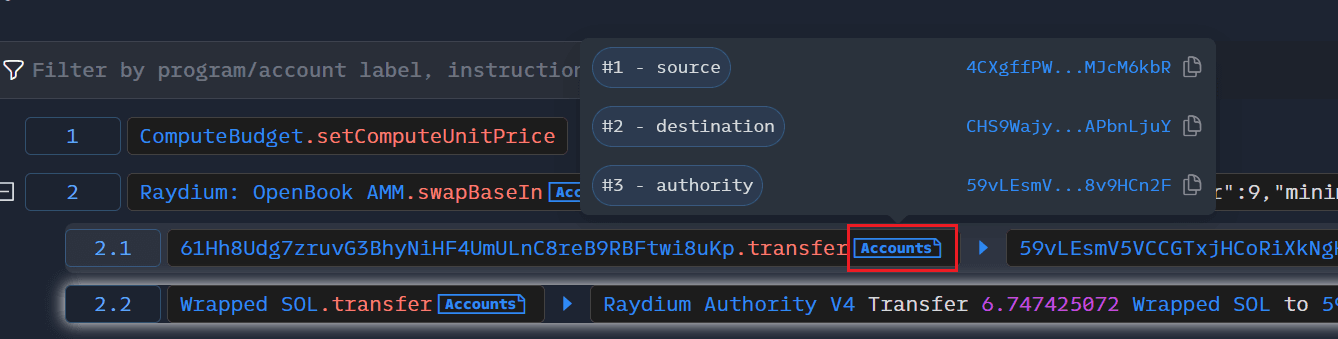
Die zweite Anweisung ruft die swapBaseIn-Funktion von Raydium AMM auf, um einen Token zu verkaufen. Das Erweitern dieser Anweisung zeigt, dass sie aus zwei CPI (Cross Program Invocation) Anweisungen besteht, die die Token-Übertragung zwischen Raydium Authority V4 und dem Transaktionsunterzeichner ermöglichen. Die vierte Anweisung ist der Prozess, bei dem der Unterzeichner Jito ein Trinkgeld zahlt, was die MEV-Natur der Transaktion bestätigt.
Wie in der folgenden Abbildung gezeigt, können wir durch Klicken auf den Tab Accounts nach jeder Anweisung alle an dieser spezifischen Anweisung beteiligten Konten anzeigen. Im Vergleich zu Solscan ist diese Anzeigemethode prägnanter, sodass sich Analysten auf die wichtigeren Informationen in der Transaktion konzentrieren können, ohne von irrelevanten Details überwältigt zu werden. Diese granulare Ansicht ist für die eingehende Solana-Transaktionsanalyse und -fehlerbehebung unerlässlich.
Schlussfolgerung
In diesem Artikel haben wir zunächst die Implementierungsprinzipien von Solana-Token eingeführt, einschließlich Native SOL, Token Programs, Mint Accounts und Token Accounts. Anschließend haben wir Solscan verwendet, um die Änderungen an Token-Konten für eine bestimmte Transaktion zu untersuchen und einige seiner Einschränkungen hervorgehoben. Schließlich haben wir eine weitere, eingehendere Analyse derselben Solana-Transaktion mit BlockSecs Phalcon Explorer durchgeführt und seine innovativen Funktionen vorgestellt, die eine überlegene Klarheit und Einblicke für die Solana-Transaktionsanalyse bieten.
Damit endet die Serie "Solana vereinfacht". Wir hoffen, dass sie Ihnen beim Verständnis der Kernkonzepte von Solana und der praktischen Transaktionsanalyse geholfen hat. Wenn Sie andere Themen besprechen möchten, wie z. B. spezifische Sicherheitsvorfälle, Ökosystemeinführungen oder andere BlockSec-Produkte, hinterlassen Sie gerne einen Kommentar! 🫡