前回の記事「Move開発におけるセキュリティプラクティス 1:Hello World」では、AptosネットワークでHello Worldプログラムを開発する方法を簡単に紹介しました。ここからは、DeFiアプリケーションの開発とそのセキュリティ上の懸念について、もう少し深く掘り下げていきます。いつものように、基本的でありながら重要な概念から始めたいと思います。この記事では、Aptosコイン(つまり、Aptosにおける代替可能なトークン[1])の開発、管理、および相互作用に焦点を当てます。
要約
この記事では、以下の点について説明します。
- Aptosコインとは何か?
- コインを作成・管理する方法
- コインと相互作用する方法
0x1. Aptosコインについて
DeFiの原子として、トークン(またはコイン)はブロックチェーンエコシステムで広く利用されてきました。これらは、電子通貨、ステーキングシェア、組織管理のための投票権など、さまざまなものを表すために使用できます。ある程度、DeFiの日常的な活動は、ブロックチェーンシステム全体での大量のトークンフローと見なすことができます。
Ethereumはトークンの標準セットを開発しました。最もよく知られているのはERC20と呼ばれ、標準的なERC20トークンが準拠する必要のあるインターフェースを指定しています。ERC20は代替可能なトークンの標準ですが、ERC721などの非代替可能なトークンの標準も存在します。
他のブロックチェーンシステムと同様に、Aptosにもトークン標準[2]があり、それぞれのブロックチェーン上でデジタル資産がどのように作成および使用されるかを定義しています。具体的には、Aptosでは代替可能なトークンをコインと呼び、非代替可能なトークン(NFT)をトークンと呼びます。以下では、Aptosコインの作成、管理、および相互作用の方法について説明します。
0x2. 初のコインの作成と管理
Aptosは公式標準モジュール(ERC20に似ています)「coin.move」を提供しています。このモジュールのAPIを呼び出すことで、どのユーザーでも簡単に独自のコインを作成できます。さらに、「coin.move」はコインを管理するための権限メカニズムも提供しており、これは複雑なDeFiアプリケーションを構築するために重要で役立ちます。以下では、このモジュールに基づいてコインを作成する方法を実演します。
前回の記事で述べたように、以下のコマンドを入力してプロジェクトを作成できます。
aptos move init --name my_coin次に、「sources」フォルダの下に新しいMoveファイルを作成する必要があります。ここでは、BSCという名前のモジュールを定義し、BSCという名前の標準コインを作成および管理する以下のサンプルコードを入力します。
module BlockSec::bsc{
    use aptos_framework::coin;
    use aptos_framework::event;
    use aptos_framework::account;
    use aptos_std::type_info;
    use std::string::{utf8, String};
    use std::signer;


    struct BSC{}

    struct CapStore has key{
        mint_cap: coin::MintCapability<BSC>,
        freeze_cap: coin::FreezeCapability<BSC>,
        burn_cap: coin::BurnCapability<BSC>
    }

    struct BSCEventStore has key{
        event_handle: event::EventHandle<String>,
    }

    fun init_module(account: &signer){
        let (burn_cap, freeze_cap, mint_cap) = coin::initialize<BSC>(account, utf8(b"BSC"), utf8(b"BSC"), 6, true);
        move_to(account, CapStore{mint_cap: mint_cap, freeze_cap: freeze_cap, burn_cap: burn_cap});
    }

    public entry fun register(account: &signer){
        let address_ = signer::address_of(account);
        if(!coin::is_account_registered<BSC>(address_)){
            coin::register<BSC>(account);
        };
        if(!exists<BSCEventStore>(address_)){
            move_to(account, BSCEventStore{event_handle: account::new_event_handle(account)});
        };
    }

    fun emit_event(account: address, msg: String) acquires BSCEventStore{
        event::emit_event<String>(&mut borrow_global_mut<BSCEventStore>(account).event_handle, msg);
    }

    public entry fun mint_coin(cap_owner: &signer, to_address: address, amount: u64) acquires CapStore, BSCEventStore{
        let mint_cap = &borrow_global<CapStore>(signer::address_of(cap_owner)).mint_cap;
        let mint_coin = coin::mint<BSC>(amount, mint_cap);
        coin::deposit<BSC>(to_address, mint_coin);
        emit_event(to_address, utf8(b"minted BSC"));
    }

    public entry fun burn_coin(account: &signer, amount: u64) acquires CapStore, BSCEventStore{
        let owner_address = type_info::account_address(&type_info::type_of<BSC>());
        let burn_cap = &borrow_global<CapStore>(owner_address).burn_cap;
        let burn_coin = coin::withdraw<BSC>(account, amount);
        coin::burn<BSC>(burn_coin, burn_cap);
        emit_event(signer::address_of(account), utf8(b"burned BSC"));
    }

    public entry fun freeze_self(account: &signer) acquires CapStore, BSCEventStore{
        let owner_address = type_info::account_address(&type_info::type_of<BSC>());
        let freeze_cap = &borrow_global<CapStore>(owner_address).freeze_cap;
        let freeze_address = signer::address_of(account);
        coin::freeze_coin_store<BSC>(freeze_address, freeze_cap);
        emit_event(freeze_address, utf8(b"freezed self"));
    }

    public entry fun emergency_freeze(cap_owner: &signer, freeze_address: address) acquires CapStore, BSCEventStore{
        let owner_address = signer::address_of(cap_owner);
        let freeze_cap = &borrow_global<CapStore>(owner_address).freeze_cap;
        coin::freeze_coin_store<BSC>(freeze_address, freeze_cap);
        emit_event(freeze_address, utf8(b"emergency freezed"));
    }

    public entry fun unfreeze(cap_owner: &signer, unfreeze_address: address) acquires CapStore, BSCEventStore{
        let owner_address = signer::address_of(cap_owner);
        let freeze_cap = &borrow_global<CapStore>(owner_address).freeze_cap;
        coin::unfreeze_coin_store<BSC>(unfreeze_address, freeze_cap);
        emit_event(unfreeze_address, utf8(b"unfreezed"));
    }

}
0x2.1 基本設計
まず、構造体部分をご覧ください。合計で3つの構造体が定義されています。
BSC構造体:コインの一意の識別子として使用されます。したがって、このコインはBlockSec::bsc::BSCパスを通じて一意に識別できます。CapStore構造体:aptos_framework::coinモジュールから取得した一部の権限を格納するために使用されます。これらの権限は、一部の特別な操作の権限に対応しており、後で説明します。BSCEventStore構造体:ユーザーイベントの記録に使用されます。
これらの構造体の後には、「init_module」関数があり、モジュールを初期化するために使用され、モジュールがチェーンに公開されたときに一度だけ呼び出されます。この関数では、モジュールはcoin::initialize<BSC>を呼び出して、BlockSec::bsc::BSCを新しいコインの一意の識別子として登録します。
public fun initialize<CoinType>(
    account: &signer,
    name: string::String,
    symbol: string::String,
    decimals: u8,
    monitor_supply: bool,
): (BurnCapability<CoinType>, FreezeCapability<CoinType>, MintCapability<CoinType>) {
    initialize_internal(account, name, symbol, decimals, monitor_supply, false)
}

/// Capability required to mint coins.
struct MintCapability<phantom CoinType> has copy, store {}

/// Capability required to freeze a coin store.
struct FreezeCapability<phantom CoinType> has copy, store {}

/// Capability required to burn coins.
struct BurnCapability<phantom CoinType> has copy, store {}登録後、「aptos_framework::coin」モジュールでBlockSec::bsc::BSC型を持つすべての汎用関数はこのコインに対して操作されます。この登録プロセスでは、それぞれコインの鋳造、ユーザーアカウントの凍結、コインの燃焼に必要な権限、すなわちMintCapability、FreezeCapability、BurnCapabilityが返されます。ある程度、このような権限構造体の機能はキーに似ており、特定の権限へのロックを解除するために使用されます。誰かがキーを持っている場合、彼は対応する権限を取得できます。ここでは、これらの権限を管理者/発行者のCapStore構造体に格納し、後で使用できるようにします。
同時に、登録プロセス中に、CoinInfo構造体が管理者アドレスの下に格納され、関連情報が記録されます。
/// Information about a specific coin type. Stored on the creator of the coin's account.
struct CoinInfo<phantom CoinType> has key {
    name: string::String,
    /// Symbol of the coin, usually a shorter version of the name.
    /// For example, Singapore Dollar is SGD.
    symbol: string::String,
    /// Number of decimals used to get its user representation.
    /// For example, if `decimals` equals `2`, a balance of `505` coins should
    /// be displayed to a user as `5.05` (`505 / 10 ** 2`).
    decimals: u8,
    /// Amount of this coin type in existence.
    supply: Option<OptionalAggregator>,
}
「init_module」関数の呼び出し後、コインはチェーンに登録されました。ただし、現時点では流通がないため、誰もこのコインを使用できません。コインを使用可能にするには、発行、割り当て、破棄などの一部の操作をサポートする必要があります。これらの操作には、コインを登録したときに取得した権限が必要です。
0x2.2 コイン管理
このコインは、次のルールに従うように設計されています。
- 管理者(admin)のみがコインを鋳造できます。
- ユーザーはいつでも自分のコインを燃焼できます。
- ユーザーはいつでも自分のアカウントを凍結/凍結解除できます。
したがって、5つの管理関数、すなわちmint_coin、burn_coin、freeze_self、emergency_freeze、unfreezeを定義します。最初の2つの関数はそれぞれコインの鋳造と燃焼を担当し、後者の3つはアカウントの凍結と凍結解除に使用されます。
コインの鋳造
私たちのモジュールでは、「mint_coin」関数がコインを鋳造するために使用されます。管理者はコインを鋳造できるだけなので、この関数で対応する権限を確認する必要があります。
public entry fun mint_coin(cap_owner: &signer, to_address: address, amount: u64) acquires CapStore, BSCEventStore{
    let mint_cap = &borrow_global<CapStore>(signer::address_of(cap_owner)).mint_cap;
    let mint_coin = coin::mint<BSC>(amount, mint_cap);
    coin::deposit<BSC>(to_address, mint_coin);
    emit_event(to_address, utf8(b"minted BSC"));
}
この関数は3つのパラメータを必要とします。
cap_ownerは&signer型、つまりトランザクションの開始者です。to_addressは、鋳造されたコインが入金されるアドレスを示します。amountは、鋳造されるコインの数を示します。
これは、権限の取得、コインの鋳造、コインの入金という3つのステップで構成されています。
まず、「mint_coin」関数の冒頭で、トランザクション開始者のアカウントアドレスはsigner::address_of(cap_owner)を通じて取得できます。その後、borrow_global<CapStore>を使用して、アカウントがCapStoreを所有しているか確認し、モジュールの管理者であることを確認します。このようにして、管理者のみがコインを鋳造でき、他のユーザーはこのステップで失敗することが保証されます。
次に、「mint_coin」関数は「aptos_framework::coin」モジュールのmint関数を呼び出してコインを鋳造します。
public fun mint<CoinType>(
        amount: u64,
        _cap: &MintCapability<CoinType>,
    ): Coin<CoinType> acquires CoinInfo {
    if (amount == 0) {
        return zero<CoinType>()
    };

    let maybe_supply = &mut borrow_global_mut<CoinInfo<CoinType>>(coin_address<CoinType>()).supply;
    if (option::is_some(maybe_supply)) {
        let supply = option::borrow_mut(maybe_supply);
        optional_aggregator::add(supply, (amount as u128));
    };

    Coin<CoinType> { value: amount }
}ここでMintCapabilityが必要です。具体的には、_capという名前のパラメータがMintCapabilityへの参照として渡される必要があります。その後、MintCapability権限に関連付けられた権限も同様に転送されます。明示的なアクセス制御はありませんが、検証はMove言語によって強制されます。
第三に、「mint_coin」関数は「deposit」関数を呼び出して、鋳造されたコインを指定されたto_addressに入金します。
ヒント#1:特権アカウントのアクセス制御は、同様の方法を使用して検証できます。
コインの燃焼
コインの燃焼プロセスは、コインの鋳造とは異なります。具体的には、管理者のみが「mint_coin」関数を呼び出すことが許可されていますが、どのユーザーでも「burn_coin」関数を呼び出すことができます。この目的のために、「burn_coin」関数は、これらのユーザーのために一時的に権限を昇格させる、つまりBurnCapability権限を取得する必要があります。
public entry fun burn_coin(account: &signer, amount: u64) acquires CapStore, BSCEventStore{
    let owner_address = type_info::account_address(&type_info::type_of<BSC>());
    let burn_cap = &borrow_global<CapStore>(owner_address).burn_cap;
    let burn_coin = coin::withdraw<BSC>(account, amount);
    coin::burn<BSC>(burn_coin, burn_cap);
    emit_event(signer::address_of(account), utf8(b"burned BSC"));
}
この関数は2つのパラメータを必要とします。
accountは&signer型、つまりトランザクションの開始者です。amountは、燃焼されるコインの数を示します。
これも、権限の取得、コインの引き出し、コインの燃焼という3つのステップで構成されています。
明らかに、「aptos_framework::coin」モジュールのburn関数は、呼び出し元にBurnCapabilityへの参照を渡すことを要求しますが、この権限は管理者のCapStoreに格納されています。したがって、一般ユーザーがこの権限を取得して保有しているコインを燃焼できるようにする必要があります。
public fun burn<CoinType>(
    coin: Coin<CoinType>,
    _cap: &BurnCapability<CoinType>,
) acquires CoinInfo {
    let Coin { value: amount } = coin;
    assert!(amount > 0, error::invalid_argument(EZERO_COIN_AMOUNT));

    let maybe_supply = &mut borrow_global_mut<CoinInfo<CoinType>>(coin_address<CoinType>()).supply;
    if (option::is_some(maybe_supply)) {
        let supply = option::borrow_mut(maybe_supply);
        optional_aggregator::sub(supply, (amount as u128));
    }
}この目標を達成するために、Move言語によって提供されるborrow_global演算子を使用できます。これは、アカウントの不変のグローバルストレージから特定のデータ型を読み取るために使用されます。この演算子を使用することで、モジュールは管理者が所有する権限を他のユーザーに**貸し出す**ことができます。つまり、管理者アドレスが目的の権限を取得するために必要です。
ただし、「burn_coin」関数のトランザクション開始者は管理者ではなくユーザーです。したがって、管理者アドレスはsigner(「mint_coin」関数のように)を通じて取得することはできません。幸いなことに、aptos_std::type_infoとBSCを使用して、この構造体が定義されているモジュールのアドレスを取得できます。モジュールは管理者アドレスの下に発行されたため、それに応じて管理者アドレスをさらに取得し、最終的にBurnCapability権限を取得できます。
ヒント#2:
_borrow_global_演算子を使用して、モジュールの権限を一時的に取得できます。
BurnCapabilityを取得した後、モジュールは指定された金額のコインをユーザーから引き出し、その権限でコインを燃焼できます。
コインアカウントの凍結と凍結解除
上記の議論に基づいて、コインアカウントの管理を簡単に進めることができます。具体的には、ユーザーが自分のコインアカウントを凍結できるように「freeze_self」関数を提供します。また、緊急凍結のための「emergency_freeze」関数も提供しており、これは管理者のみが使用できます。さらに、緊急凍結メカニズムが存在するため、ユーザーは自分で凍結解除できないようにする必要があります。したがって、「unfreeze」関数も管理者がユーザーアカウントを凍結解除することを要求します。
public entry fun freeze_self(account: &signer) acquires CapStore, BSCEventStore{
    let owner_address = type_info::account_address(&type_info::type_of<BSC>());
    let freeze_cap = &borrow_global<CapStore>(owner_address).freeze_cap;
    let freeze_address = signer::address_of(account);
    coin::freeze_coin_store<BSC>(freeze_address, freeze_cap);
    emit_event(freeze_address, utf8(b"freezed self"));
}

public entry fun emergency_freeze(cap_owner: &signer, freeze_address: address) acquires CapStore, BSCEventStore{
    let owner_address = signer::address_of(cap_owner);
    let freeze_cap = &borrow_global<CapStore>(owner_address).freeze_cap;
    coin::freeze_coin_store<BSC>(freeze_address, freeze_cap);
    emit_event(freeze_address, utf8(b"emergency freezed"));
}

public entry fun unfreeze(cap_owner: &signer, unfreeze_address: address) acquires CapStore, BSCEventStore{
    let owner_address = signer::address_of(cap_owner);
    let freeze_cap = &borrow_global<CapStore>(owner_address).freeze_cap;
    coin::unfreeze_coin_store<BSC>(unfreeze_address, freeze_cap);
    emit_event(unfreeze_address, utf8(b"unfreezed"));
}
ヒント#3:権限を関数を通じて返す際には注意してください!これらの権限を取得した悪意のあるユーザーは、それらを悪用してコイン保有者に損害を与える可能性があります!
0x3. コインとの相互作用
ここでは、コインと相互作用する方法に焦点を当てます。
0x3.1 登録
モジュールに「register」関数が存在することに気付いたかもしれません。
public entry fun register(account: &signer){
    let address_ = signer::address_of(account);
    if(!coin::is_account_registered<BSC>(address_)){
        coin::register<BSC>(account);
    };
    if(!exists<BSCEventStore>(address_)){
        move_to(account, BSCEventStore{event_handle: account::new_event_handle(account)});
    };
}
この関数は、ユーザーがコインの使用権とイベントレコーダーを登録するのを支援するために使用されます。特定のコインを使用するためには、「aptos_framework::coin」モジュールは、ユーザーが「aptos_framework::coin::register」関数を通じてコインの使用権を明示的に登録する必要があると規定しています。
public fun register<CoinType>(account: &signer) {
    let account_addr = signer::address_of(account);
    assert!(
        !is_account_registered<CoinType>(account_addr),
        error::already_exists(ECOIN_STORE_ALREADY_PUBLISHED),
    );

    account::register_coin<CoinType>(account_addr);
    let coin_store = CoinStore<CoinType> {
        coin: Coin { value: 0 },
        frozen: false,
        deposit_events: account::new_event_handle<DepositEvent>(account),
        withdraw_events: account::new_event_handle<WithdrawEvent>(account),
    };
    move_to(account, coin_store);
}ユーザーは、この関数を通じてこのタイプのコインを登録した場合にのみ、このコインを通常通り保持できます。つまり、特定のコインを保持したくない場合、相手はあなたの同意なしにそのコインをあなたの口座に入れることはできません。登録は実際には、あなたの口座に(対象のコインタイプの)CoinStore構造体を配置します。このCoinStore構造体には、あなたの残高を記録するCoin構造体が含まれています。
ヒント#4:Ethereumトークンとは異なり、Aptosコインはユーザーの明示的な登録なしには保持および操作できません。
0x3.2 転送
BSCコインをいくらか持っていると仮定すると、「aptos_framework::coin」モジュールのtransfer関数を呼び出すことで、これらのコインを転送できます。
public entry fun transfer<CoinType>(
    from: &signer,
    to: address,
    amount: u64,
) acquires CoinStore {
    let coin = withdraw<CoinType>(from, amount);
    deposit(to, coin);
}これは「coin」モジュールによって提供されるエントリー関数であることに注意してください。ロジックは、2つの公開関数、すなわちwithdrawとdepositの呼び出しで構成されます。withdraw関数は、あなたの口座から一定量の資産を引き出してコインにするために&signer権限を必要とします。deposit関数は、登録済みのどのコインアカウントにもコインを入金できます。この関数は追加の権限を必要とせず、指定されたコインをアカウントアドレスに入金します。最後に、転送されたコインは、ターゲットアドレスのCoinStore構造体に格納されているコインと自動的にマージされます。
ヒント#5:引き出し後、コイン内の資産は現在の
transfer関数の制御下にあります。この関数は、追加の権限を取得することなく、これらの資産をdeposit関数に配信できます。
0x3.3 分割とマージ
Ethereumトークンとは異なり、コインの流通はユーザーの残高を変更することでは更新できません。代わりに、coinモジュール内のCoin構造体を引き出すことで達成できます。このようにして、ユーザーは、この構造体を他のモジュールに渡すことによって資産の流通を実現します。構造体はそれを定義したモジュールによってのみ操作できるため、「coin」モジュールは、コインをより小さな単位に分割したり、複数のコインをマージしたりして、さまざまなシナリオのニーズを満たすためのインターフェースを提供します。
-
extract関数はコインを分割するために使用されます。Coin構造体を受け取り、その一部の資産を抽出して新しいCoin構造体を生成し、新しい構造体を返します。public fun extract<CoinType>(coin: &mut Coin<CoinType>, amount: u64): Coin<CoinType> { assert!(coin.value >= amount, error::invalid_argument(EINSUFFICIENT_BALANCE)); coin.value = coin.value - amount; Coin { value: amount } } -
extract_all関数は、元のCoin構造体の全額を抽出して新しいCoin構造体に預け入れるために使用されます。その結果、元のCoin構造体の値はゼロ(zero_coin)になります。zero_coin構造体は、「destroy_zero」関数を呼び出すことで破棄できます。public fun extract_all<CoinType>(coin: &mut Coin<CoinType>): Coin<CoinType> { let total_value = coin.value; coin.value = 0; Coin { value: total_value } } public fun destroy_zero<CoinType>(zero_coin: Coin<CoinType>) { let Coin { value } = zero_coin; assert!(value == 0, error::invalid_argument(EDESTRUCTION_OF_NONZERO_TOKEN)) } -
merge関数はコインをマージするために使用されます。2つのCoin構造体、すなわちsource_coinとdst_coinの値をdst_coin構造体にマージし、source_coin構造体を破棄できます。public fun merge<CoinType>(dst_coin: &mut Coin<CoinType>, source_coin: Coin<CoinType>) { spec { assume dst_coin.value + source_coin.value <= MAX_U64; }; dst_coin.value = dst_coin.value + source_coin.value; let Coin { value: _ } = source_coin; } -
zero関数はzero_coin構造体を生成するために使用されます。public fun zero<CoinType>(): Coin<CoinType> { Coin<CoinType> { value: 0 } }
0x4. コインのテスト
このコインを迅速にテストするには、まず次のコマンドでデプロイできます(Move.tomlで発行者アカウントアドレスを設定することを忘れないでください!)
$ aptos move publish --package-dir ./
Compiling, may take a little while to download git dependencies...
INCLUDING DEPENDENCY AptosFramework
INCLUDING DEPENDENCY AptosStdlib
INCLUDING DEPENDENCY MoveStdlib
BUILDING my_coin
package size 2751 bytes
Do you want to submit a transaction for a range of [868300 - 1302400] Octas at a gas unit price of 100 Octas? [yes/no] >
yes
{
  "Result": {
    "transaction_hash": "xxx",
    ...
このようにして、コインはチェーンに正常に公開されましたが、流通はありません。鋳造されたコインを受け取るには、アカウントを登録する必要があります。
$ aptos move run --function-id default::bsc::register
Do you want to submit a transaction for a range of [153100 - 229600] Octas at a gas unit price of 100 Octas? [yes/no] >
yes
{
  "Result": {
    "transaction_hash": "xxx",
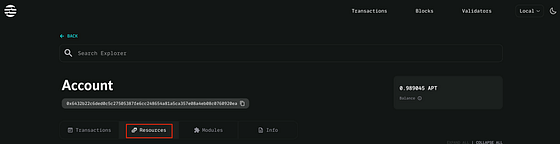
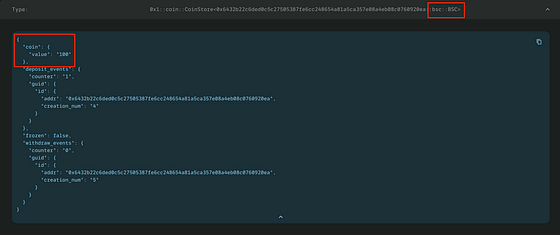
...注意:2番目のコマンドの**Your-address**は、あなた自身のアドレス(.aptos/config.yamlのaccountを参照)に置き換える必要があります。ブラウザであなたのアドレスを入力し、「Resources」タブをクリックすると、このアカウントに100 BSCコインがあることがわかります。
別の口座にコインを転送したい場合は、その口座にもコインを使用するために登録してもらうことを忘れないでください。transfer関数は汎用関数であるため、汎用パラメータとしてBSCとto_addressを指定する必要があります。次のようになります。
$ aptos move run — function-id 0x1::coin::transfer — type-args BSC-module-address::bsc::BSC — args address:To_address u64:1
このコマンドは、coinモジュールのtransfer関数を呼び出して、1 BSCコインを**To_addressに転送します。ここでは、0x1::coin::transferがtransfer関数の関数IDです。BlockSec::bsc::BSCがあなたのコインの識別子であることを覚えておいてください。汎用パラメータはそれに指定する必要があります。さらに、BSC-module-addressは、Move.tomlでBlockSec**に割り当てられたモジュール発行者アカウントアドレスに置き換える必要があります。
0x5. 次は何?
独自のコインを作成、管理、および相互作用する方法を理解したら、最初のDeFiの基盤プロジェクトである自動マーケットメーカー(AMM)を構築する方法を実演します。Move開発とセキュリティプラクティスに関連するさらに興味深いトピックが取り上げられます。お楽しみに!
参照
[1] https://aptos.dev/concepts/coin-and-token/aptos-coin/ [2] https://aptos.dev/concepts/coin-and-token/index [3] https://aptos.dev/concepts/coin-and-token/aptos-token