随着 Aptos 网络 于 10 月 18 日上线主网,Move 编程语言及其生态系统正在不断扩大其影响力。为了吸引社区,我们将发布一系列文章,介绍 Move 中的安全开发实践。我们将通过示例、解释以及最重要的是安全实践,带领大家走进 Move 世界。
摘要
本文将告诉您:
- 如何创建和开发 Aptos 应用程序;
- 模块(即 Move 中的智能合约)是什么样的;
- 如何在本地网络上编译和发布模块;
- 如何与模块进行交互并在浏览器中检查发出的事件。
0x1. 关于 Move 及其生态系统
Move 是继承自 Diem(2020 年 12 月之前,其名称为 Libra)的用于智能合约开发设计的编程语言。它被声称是安全、快速且灵活的,旨在成为下一代编程语言。然而,像 Aptos 和 Sui 这样的新项目并没有直接采用原始 Move,而是在其基础上进行了一些修改以满足自身需求。
除非另有说明,我们将主要关注 Aptos 环境下的开发实践,因为这些理念对于其他基于 Move 的项目也通用。我们还假设您已经阅读了 MoveBook,对 Move 编程语言有了基本了解。
0x2. 准备环境
0x2.1 Aptos 工具链
Aptos 已将 Move 集成到其 CLI 中。因此,建议按照 CLI 安装 来安装相应的工具链。安装完成后,在终端输入 aptos,您应该会看到以下输出:
$ aptos
aptos 1.0.1
Aptos Labs <[email protected]>
Command Line Interface (CLI) for developing and interacting with the Aptos blockchain
USAGE:
    aptos <SUBCOMMAND>
OPTIONS:
    -h, --help       Print help information
    -V, --version    Print version information
SUBCOMMANDS:
    account       Tool for interacting with accounts
    config        Tool for interacting with configuration of the Aptos CLI tool
    genesis       Tool for setting up an Aptos chain Genesis transaction
    governance    Tool for on-chain governance
    help          Print this message or the help of the given subcommand(s)
    info          Show build information about the CLI
    init          Tool to initialize current directory for the aptos tool
    key           Tool for generating, inspecting, and interacting with keys
    move          Tool for Move related operations
    node          Tool for operations related to nodes
    stake         Tool for manipulating stake and stake pools
0x2.2 本地测试网和账户
Aptos 为开发和部署提供了几种网络(即主网、测试网、开发网和本地测试网)。在本文中,我们将使用本地测试网。
要启动本地测试网,请键入以下命令:
$ aptos node run-local-testnet --with-faucet --force-restart
您应该会看到输出:
......
Aptos is running, press ctrl-c to exit
Faucet is running.  Faucet endpoint: 0.0.0.0:8081
现在,您可以通过键入以下命令创建您的账户(如果您想让前一个终端保持在前台,可能需要在另一个终端窗口中执行此操作):
$ aptos init
此命令将带您进入一个交互式 shell,需要您指定一些属性。在这里,我们选择 local 网络。之后,当前目录下会有一个 .aptos 文件夹,其中包含您的默认账户配置。检查该文件并复制您的 account 地址(例如,c0d8xxxxxxxxxxxxxxxxxxxxxxxxxxxxxxxxxxxxxxxxxxxxxxxxxxxxxxxx14bd)。
提示 #1:请妥善保管您的账户配置文件!您的私钥就写在里面!
0x3. 第一个 Hello World 程序
Hello World 程序总是作为学习编程的第一步。我们希望遵循这一惯例来演示开发 Move 应用程序的方法。
0x3.1 准备包
选择一个您喜欢的目录并键入以下命令:
$ aptos move init --framework-local-dir "../../aptos-core/aptos-move/framework/aptos-framework" --name hello
此命令将在给定位置(即开发工作区)创建一个新的 Move 包。由于 Aptos 框架中的某些库函数是必需的,因此指定了 Aptos 框架的本地目录(如果位置不同,可能需要更改相对路径);或者,也可以通过使用 --framework-git-rev 来指定 Aptos 框架的 git 版本或分支。
现在您可以在您的目录中看到一个 Move.toml 文件。该文件不仅列出了一些依赖配置,还描述了包的名称和版本。此外,还有一个名为 sources 的文件夹,用于存储 Move 源代码。在 sources 目录中创建一个 .move 文件后,工作区就准备好了。
[package]
name = 'hello'
version = '1.0.0'
[dependencies.AptosFramework]
local = '../../aptos-core/aptos-move/framework/aptos-framework'
[addresses]
BlockSec="c0d8xxxxxxxxxxxxxxxxxxxxxxxxxxxxxxxxxxxxxxxxxxxxxxxxxxxxxxxx14bd"
在 Move.toml 的最后一行,我们将刚才创建的账户地址与 BlockSec 相关联。这用于发布此包中的模块(即部署智能合约)(稍后将讨论)。请注意,上述地址只是一个占位符,您必须将其替换为您自己的账户地址。
0x3.2 准备模块
下面是一个简单但完整的示例模块,可以直接放入 move 文件(例如 hello.move)。接下来,我们将逐行分析代码,以说明 Move 与其他编程语言的区别。如果您对此非常熟悉,可以跳过本节。
module BlockSec::hello{
    use aptos_framework::account;
    use aptos_framework::event;
    use std::signer;
    use std::string::{String, utf8};
    struct SecEventStore has key{
        event_handle: event::EventHandle<String>,
    }
    public entry fun say_hello_script(account: &signer) acquires SecEventStore{
        say_hello(account);
    }
    public fun say_hello(account: &signer) acquires SecEventStore{
        let address_ = signer::address_of(account);
        if(!exists<SecEventStore>(address_)){
            move_to(account, SecEventStore{event_handle: account::new_event_handle(account)});
        };
        event::emit_event<String>(&mut borrow_global_mut<SecEventStore>(address_).event_handle, utf8(b"Hello World!"));
    }
}
在这里,我们定义了一个名为 hello 的模块,它将被发布到 BlockSec 地址。此模块的入口函数名为 say_hello_script,它将调用 say_function 函数。很容易看出,该模块用于发出带有“Hello World!”消息的事件(在 say_hello 函数中)。但是,仍然存在一些需要详细解释的细节。
具体来说,为了在 aptos_framework 命名空间中使用 event::emit_event 函数,我们需要一个 event::EventHandle 结构体,因为 emit_event 函数的声明如下:
/// Emit an event with payload `msg` by using `handle_ref`'s key and counter.
public fun emit_event<T: drop + store>(handle_ref: &mut EventHandle<T>, msg: T)
struct EventHandle<phantom T: drop + store> has store {
    /// Total number of events emitted to this event stream.
    counter: u64,
    /// A globally unique ID for this event stream.
    guid: GUID,
}
请注意,EventHandle 没有 key 能力,这意味着我们必须将其存储在另一个结构体中。因此,我们定义了一个名为 SecEventStore 的结构体来存储 EventHandle:
struct SecEventStore has key{
    event_handle: event::EventHandle<String>,
}
提示 #2:我们必须考虑 Move 中结构体的能力。请记住,只有
**_key_**能力才能被**_move_to_**。如果一个模块返回一个只有**_store_**能力的结构体,而您想在全局存储中保留它,请考虑定义一个新的结构体作为包装器。
为了简单起见,我们使用 String 来表示消息。所以 say_hello 函数的最后一步是:
event::emit_event<String>(&mut borrow_global_mut<SecEventStore>(address_).event_handle, utf8(b"Hello World!"));
提示 #3:Move 不原生支持
**_String_**类型。标准库提供了将字节向量传输到**_String_**_ 的能力。有关更多详细信息,请查看其 GitHub 仓库中的源代码。_
为了确保每个新用户都必须注册一个 SecEventStore,我们需要首先通过 exists 函数检查用户账户中该结构体的存在性。如果用户没有该资源,该函数将创建一个并将其移动到用户账户。
if(!exists<SecEventStore>(address_)){
    move_to(account, SecEventStore{event_handle: account::new_event_handle(account)});
};
0x3.3 编译和发布模块
模块准备好后,我们可以使用以下命令进行编译:
$ aptos move compile
Compiling, may take a little while to download git dependencies...
INCLUDING DEPENDENCY AptosFramework
INCLUDING DEPENDENCY AptosStdlib
INCLUDING DEPENDENCY MoveStdlib
BUILDING hello
{
  "Result": [
    "c0d8xxxxxxxxxxxxxxxxxxxxxxxxxxxxxxxxxxxxxxxxxxxxxxxxxxxxxxxx14bd::hello"
  ]
}
我们也可以根据需要进行测试:
$ aptos move test
INCLUDING DEPENDENCY AptosFramework
INCLUDING DEPENDENCY AptosStdlib
INCLUDING DEPENDENCY MoveStdlib
BUILDING hello
Running Move unit tests
Test result: OK. Total tests: 0; passed: 0; failed: 0
{
  "Result": "Success"
}
现在我们可以将模块部署到 Aptos 网络。请记住,我们已将账户与 BlockSec 相关联,因为用户只能将模块发布到其控制下的账户。此外,水龙头已经向该账户充值了一些 APT 来支付 Gas 费用。唯一剩下的就是将 Move 包中的模块发布到 Aptos 网络,如下所示:
$ aptos move publish --package-dir ./ --profile default
Compiling, may take a little while to download git dependencies...
INCLUDING DEPENDENCY AptosFramework
INCLUDING DEPENDENCY AptosStdlib
INCLUDING DEPENDENCY MoveStdlib
BUILDING hello
package size 1271 bytes
Do you want to submit a transaction for a range of [672200 - 1008300] Octas at a gas unit price of 100 Octas? [yes/no] >
yes
{
  "Result":
  ...
}
同样,这也是一个交互式 shell,并且 Result 的内容已被省略。
0x3.4 与模块交互
为了让模块发出事件,只需键入以下命令:
$ aptos move run --function-id default::hello::say_hello_script
Do you want to submit a transaction for a range of [34500 - 51700] Octas at a gas unit price of 100 Octas? [yes/no] >
yes
{
  "Result": {
    "transaction_hash": "0x9af16532de5e79803c823fe28e3251703927d93809274b76972d8e83c6fcd433",
    ...
    }
}
作为一个入口函数,say_hello_script 函数可以直接调用。您也可以编写一个脚本并在脚本中调用 say_hello 函数。
提示 #4:为了更好的交互体验,定义一些入口函数是一个好习惯。您也可以开发一些脚本供用户与您的项目进行交互。
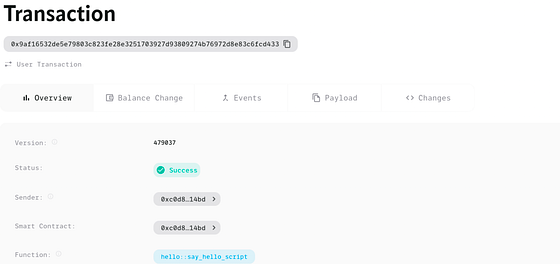
与传统的 Web2 Hello World 程序不同,发出的事件不会在 shell 中显示。请查看 Aptos explorer 并选择 local 网络。
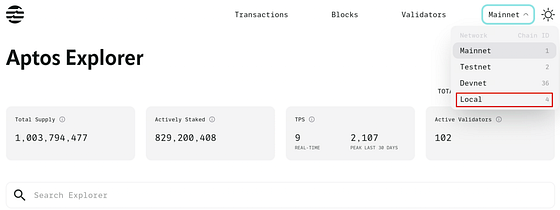
然后复制 shell 中的 transaction_hash 值并粘贴到搜索栏中,您将看到交易详情。
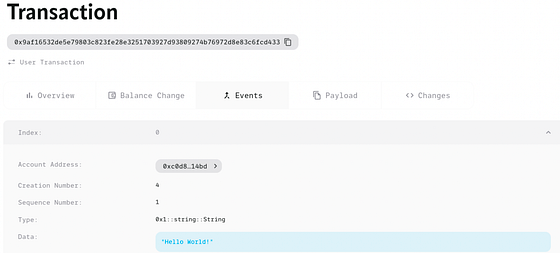
最后,点击 Events,Aptos 网络将向您致以问候。
0x4. 下一步?
Hello World 程序只是开发 Move 应用程序的一小步。在接下来的系列文章中,我们将介绍更多关于在 Aptos 上开发安全可靠的 Move 应用程序的内容。敬请关注!
关于 BlockSec
BlockSec 是一家开创性的区块链安全公司,于 2021 年由一群全球顶尖的安全专家创立。公司致力于提升新兴 Web3 世界的安全性和可用性,以促进其大规模采用。为此,BlockSec 提供智能合约和 EVM 链 安全审计 服务、用于安全开发和主动威胁拦截的 Phalcon 平台、用于资金追踪和调查的 MetaSleuth 平台,以及供 Web3 构建者高效冲浪加密世界的 MetaSuites 扩展。
迄今为止,公司已为 MetaMask、Uniswap Foundation、Compound、Forta 和 PancakeSwap 等 300 多家尊贵客户提供服务,并获得了来自 Matrix Partners、Vitalbridge Capital 和 Fenbushi Capital 等领先投资者的两轮融资,总计数千万美元。
官方 Twitter 账号:https://twitter.com/BlockSecTeam